How Mathua Works
The engine behind the learning: a technical explanation of the concept graph, student model, diagnostic algorithm, task selection and scoring system.
The Concept Graph
Mathua represents all mathematical knowledge as a directed acyclic graph (a DAG). Each node in the graph is an atomic concept: the smallest unit of mathematical knowledge that can be practiced and mastered independently. Each directed edge is a prerequisite relationship. If concept B has an edge from concept A, then A must be mastered before B is ever shown to the student.
The graph currently contains 1250 concepts spanning 23 domains: from early Counting through Calculus, Linear Algebra and Topology.
{
  "id": "frac.add.diff",
  "label": "Add fractions with different denominators",
  "domain": "fractions",
  "subdomain": "fractions.addition",
  "prerequisites": ["frac.add.same", "arith.factor.lcm"],
  "mastery_threshold": { "streak": 5, "avg_time_seconds": 18.0 }
}
The graph is stored as a flat JSON file: data/concepts.json, and is community-editable. A graph validator runs on every pull request and rejects the change if it introduces a cycle.
The Student Model
Every concept in the graph has a state for each student:
| Skill | Correct answers in a row needed | Time per question |
|---|---|---|
| Single-digit addition | 5 | 8 seconds |
| Multiplication tables | 7 | 6 seconds |
| Add fractions with different denominators | 5 | 18 seconds |
| Solve one-step addition equations | 5 | 12 seconds |
| Long division | 5 | 20 seconds |
Spaced Repetition
When a concept reaches MASTERED, Mathua immediately schedules its next review using a simplified SM-2 algorithm.
first review:   1 day
second review:  3 days
third review:  interval × ease_factor
ease_factor: starts at 2.5
decreases by 0.2 on each failed review
minimum value: 1.3
Reviews are never presented as a separate "review mode." They are woven into every session by the scheduler, which manages the 70/30 balance between new material and review automatically.
The Diagnostic Algorithm
When a student first opens Mathua, they enter a Computerised Adaptive Testing (CAT) session. The goal is to find the student's starting point using as few questions as possible.
- I.The concept graph is sorted topologically. The diagnostic builds a covering set from the graph roots and evenly spaced concepts.
- II.If the student answers correctly within the time limit, the algorithm moves forward: it next tests a concept further along the prerequisite chain.
- III.If the student answers incorrectly or exceeds twice the expected time, the algorithm moves backward: it tests a concept earlier in the chain.
- IV.The assessment continues with multiple probes per concept until the student's starting point is clearly established.
- V.The diagnostic records a starting mastery estimate for every concept the student passed through. Concepts answered correctly count as LEARNING. Concepts answered quickly and accurately count as conditionally MASTERED and are skipped in early sessions.
The diagnostic test asks as few questions as possible. Without this algorithm, a naive assessment of 1250 concepts would require up to 1250 questions. The CAT approach, picking each question by information gain over a covering set, reduces this by roughly 94%.
The diagnostic test can be retaken at any time from your profile. Retaking does not delete progress: it creates a new knowledge estimate that is merged with existing data, always preferring the more optimistic estimate so students are never penalised for reassessing.
The Task Selection Algorithm
The scheduler runs after every question is submitted. It selects the next concept by computing a priority score for every eligible concept.
priority = (0.7 × days_since_last_seen)
+ (0.3 × (1.0 − mastery_score))
+ 5.0   if status == DECAYING
+ 2.0   if newly unlocked this session
Three hard rules the scheduler enforces regardless of priority scores:
Scoring and Ranking
Mathua tracks two separate scoring systems:
topic_score = (mastered_concepts × 100)
+ Σ speed_bonus per mastered concept
+ domain_completion_bonus (200 pts if all concepts mastered)
speed_bonus = max(0, (time_limit − avg_time) / time_limit × 50)
weekly_score = (concepts_mastered_this_week × 100)
+ speed_bonus_this_week
+ (current_day_streak × 10)
Generator-Based Problems
Every problem in Mathua is generated on demand by a parameterised Go function: a generator. There is no static question bank.
// internal/generator/arithmetic/add.go
type AddSingleGen struct{}

func (g *AddSingleGen) Generate(difficulty float64) generator.Problem {
    max := int(5 + difficulty*4)
    a   := rand.Intn(max) + 2
    b   := rand.Intn(max) + 2
    ans := a + b
    return generator.Problem{
        Question:    fmt.Sprintf("%d + %d = ?", a, b),
        Answer:      strconv.Itoa(ans),
        Explanation: fmt.Sprintf("%d + %d = %d", a, b, ans),
    }
}
The difficulty parameter scales operand size from 0.0 to 1.0. The scheduler passes a difficulty value based on the student's current mastery score.
Expression Grading with SymPy
From algebra onward, answers are expressions: x = 4, (x+2)(x+3), 2x² + 3x - 5 where numeric comparison is no longer sufficient. Mathua uses a mixed Go/Python grading system: the router dispatches nine grading types, six pure-Go graders and mathematical equivalence for algebra, calculus, differential equations and trigonometry is handled by a Python subprocess running sympy, bundled into the production image.
The Router selects the grader by grading_type. Concepts with type symbolic, polynomial or expression route to gradeSymPy, which runs a long-lived Python 3 subprocess. The production image installs SymPy (pinned) and fails the build if it cannot grade, so there is no fallback path.
// internal/grader/router.go
func (r *Router) Grade(t GradingType, expected, answer string) Result {
    switch t {
    case GradingNumeric:
        return r.numeric.grade(expected, answer)
    case GradingPolynomial, GradingExpression, GradingSymbolic:
        return gradeSymPy(expected, answer) // Python subprocess
    case GradingMultipleChoice:
        return r.choice.grade(expected, answer)
    case GradingComparison:
        return r.comparison.grade(expected, answer)
    case GradingOrdering:
        return r.ordering.grade(expected, answer)
    case GradingTuple:
        return r.tuple.grade(expected, answer)
    case GradingComplex:
        return r.complex.grade(expected, answer)
    }
}

// internal/engine/engine.go, a generator may override the router:
func (e *Engine) gradeAnswer(conceptID, expected, answer string) grader.Result {
    if gen, err := e.registry.Get(conceptID); err == nil {
        if gg, ok := gen.(generator.GradedGenerator); ok {
            return gg.Grade(expected, answer)
        }
    }
    return e.gr.Grade(gradingTypeOf(conceptID), expected, answer)
}
The Go client sends JSON requests to the Python subprocess via stdin. SymPy parses both expressions into trees and checks equivalence with simplify(expected - answer) == 0. This catches identities that string or coefficient comparison never could:
# grading/sympy_service.py
import sys, json
from sympy import simplify, parse_expr, Symbol

for line in sys.stdin:
    req = json.loads(line)
    expected = parse_expr(req["expected"])
    answer   = parse_expr(req["answer"])
    correct  = simplify(expected - answer) == 0
    print(json.dumps({"id": req["id"], "correct": correct}))
Examples of equivalences SymPy can detect:x² + 2x + 1 == (x+1)² · sin²(x) + cos²(x) == 1 · xe^x − e^x + C == e^x(x−1) + C · 2e^(2x) == 2exp(2x)
Measuring Learning
Every answer in Mathua writes one row to an attempt log: student, concept, correctness, elapsed seconds, timestamp. Nothing is sampled or aggregated at write time, every metric below is computed from that raw log, per student or product-wide.
| Metric | What it means |
|---|---|
| First-pass rate | Share of concepts answered correctly on the very first attempt. |
| Second-pass rate | Share correct within the first two attempts, the recovery metric. A gap between first- and second-pass means material is learnable with feedback but not yet automatic. |
| Average attempts per concept | Mean attempts across concepts; falls as fluency builds. |
| Retention | Students active in two or more distinct weeks ÷ all students who ever attempted. A coarse cohort signal, not a week-over-week curve. |
| First-pass trend | Last week minus first week. Positive means accuracy improved across the observed window; noisy at small N. |
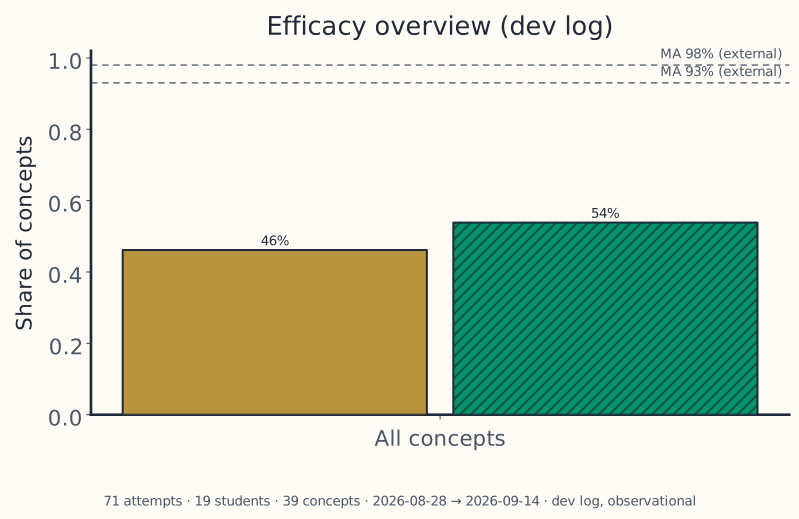
These are usage metrics, not an efficacy claim: no control group, no randomisation. Compare within a student over weeks, not across learners at different frontiers and always read a weekly rate alongside its active-student count, since a week with three attempts can show 0% or 100% by accident.
The figure above refreshes weekly from the live product-wide log, read it with its sample size, which rides in the caption. Early numbers move a lot; that is normal, not a verdict. Your live per-student numbers are on your Profile, and the full methodology with regeneration commands lives in Docs.
Ready to find your starting point?